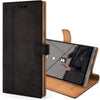

Your Galaxy S22 Plus camera is one of the best parts of your phone, and also one of the most exposed. Every time you toss your phone on a table or into a bag, those lenses take the hit. On top of that, a lot of us have had that weird moment of wondering whether a camera is watching when it should not be. This slim black case tackles both concerns with a simple slide-to-cover lens shield. It keeps your camera protected, your privacy in your own hands, and your phone feeling almost bare.

Why This Case Matters
Camera lenses are small, but they are expensive to fix. A scratch or crack right over the lens can ruin your photos for good. A case that physically covers the camera when you are not shooting removes a lot of that risk.
Privacy is the other half of the story. With a sliding cover, you decide when your camera is exposed, and you can see at a glance whether it is open or closed. That simple physical control is reassuring in a world full of video calls and apps asking for permissions.
Many people avoid protective cases because they hate the bulk. This design is described as ultra-thin and compact, fitting snugly so your phone feels close to bare in your hand. You get meaningful protection without the brick-like feel.
Key Features Breakdown
Here is a closer look at what this case brings to your Galaxy S22 Plus. Every point below is pulled from the product listing, so there are no surprises.
Camera cover slide design. A sliding lens shield protects the Galaxy S22 Plus camera from collisions and scratches. It also helps protect your privacy by covering the lenses whenever you want.
Cushioned corners. The corners are cushioned to help guard your phone against accidental drops and shocks. Corners are often the first point of impact, so this is where extra padding counts.
Wireless charging friendly. You do not need to take the case off to charge wirelessly. Just set your phone on the pad and go.
Tactile buttons. The listing highlights exquisite tactile buttons that respond sensitively. You still get a satisfying press when adjusting volume or waking the screen.
Full access. You get access to all ports, controls, and sensors. Charging, audio, and daily controls all work with the case on.
Ultra-thin and compact. The case fits snugly against the Galaxy S22 Plus. The goal is a touch that feels closer to a bare phone, so you keep that sleek in-hand experience.
Who This Case Is For
If you take a lot of photos, this case is for you. Keeping the lens covered between shots helps you avoid pocket scratches that can blur your images.
Privacy-minded folks will love the slide cover too. Remote workers, students on video classes, and anyone who simply likes knowing their camera is covered will appreciate the control. A quick slide is all it takes.
This case is also a good fit for people who want a slim, clean look. The black finish is understated and goes with everything from office wear to gym clothes. It does not shout, but it does its job.
Finally, it suits anyone who uses wireless charging every day. You can keep the case on all the time and still drop your phone on a charging pad at night. One less thing to fiddle with before bed.
Please note that this case is made only for the Galaxy S22 Plus, also called the S22+, in its 5G version. Check your model before ordering to make sure you get a perfect fit.
Technical Details
Here is a straightforward summary of the listed specs. Use it as a quick reference while you shop.
Compatible device: Samsung Galaxy S22+ and S22 Plus 5G only. Color: Black.
Camera protection: Slide lens cover that shields the camera from collisions and scratches and supports privacy. Corner design: Cushioned corners to help with accidental drops and shocks.
Charging: Supports wireless charging with the case on. Buttons: Tactile buttons with sensitive response.
Access: All ports, controls, and sensors remain accessible. Profile: Ultra-thin and compact with a snug fit.
For photos and current availability, visit the Galaxy S22 Plus camera cover case in black on our site.
Customer Story: The Remote Work Pro
Picture this: a home office set up in the corner of a small apartment, with a laptop, a ring light, and a Galaxy S22 Plus propped up for quick calls. Our illustrative remote worker, let us call him Marcus, jumps between video meetings all day long. Between calls, his phone gets tossed on the desk, slid into a hoodie pocket, and carried to the kitchen.
With a slide-cover case like this one, Marcus gets into a simple rhythm. When a call ends, he slides the cover closed over the lenses, and he can see at a glance that the camera is covered. When he wants to snap a photo of a whiteboard or his dog doing something ridiculous, he slides it open and shoots.
The slim profile means the phone still slips easily into his pocket during an afternoon walk. At night, he drops it on his wireless charger without removing the case. It is a small set of changes, but it gives him more control and fewer worries about his lenses.
Protection Tips from the Pepper Crew
A smart case works even better with a few smart habits. Here are our top tips for keeping your Galaxy S22 Plus looking sharp.
1. Close the slide when you are not shooting. Make it a habit to slide the cover shut after you take photos. That keeps your lenses shielded during the hours your camera is not in use.
2. Clean the slide track occasionally. Dust and lint can build up around moving parts. A soft brush or a dry cloth keeps the slider gliding smoothly.
3. Pair it with a screen protector. This listing focuses on camera and corner protection. Adding a separate screen protector helps round out your coverage.
4. Avoid pockets full of keys. A slim case is pocket-friendly, but keys and coins can still scuff any finish. Give your phone its own pocket when you can.
5. Check the fit after installing. Press around every edge to make sure the case is fully seated. A snug fit lets the cushioned corners do their job.
6. Open the slide before video calls. It sounds obvious, but a quick check saves you from starting a meeting with a black screen. A little routine goes a long way.
What's in the Box and How to Install
Your package includes the Galaxy S22 Plus camera cover case in black. Installation takes less than a minute.
Step 1: Wipe your phone with a soft, dry cloth to remove dust and fingerprints. A clean surface helps the case sit flush.
Step 2: Make sure the camera slide is open so you can align the camera cutout. Fit the top of your phone into the case first.
Step 3: Press the bottom edge into place, then work your fingers around the sides and corners. The case should hug your phone snugly.
Step 4: Test each button, then slide the camera cover closed and open again. Everything should move smoothly and respond with a crisp feel.
Frequently Asked Questions
1. Which phone does this case fit?
This case is made only for the Samsung Galaxy S22+ and S22 Plus 5G. It will not fit the standard Galaxy S22 or the Galaxy S22 Ultra, which have different sizes and camera layouts. Check your phone settings under About Phone to confirm your exact model before you place your order today.
2. How does the camera cover work?
The case features a slide design that moves over your camera lenses. Slide it closed to protect the camera from collisions and scratches, or to cover the lenses for privacy. Slide it open when you are ready to take photos or video. It is a quick motion you can do one-handed.
3. Does the slide cover help with privacy?
Yes, the listing describes the slide lens protection as a way to protect both your camera and your privacy. When the slide is closed, the lenses are physically covered. Many people like being able to see at a glance whether their camera is open or shut, especially between video calls.
4. Can I charge my phone wirelessly with this case on?
Yes, the case supports wireless charging. You do not need to take it off when you place your phone on a wireless charger. That makes it easy to keep the case on around the clock, whether you charge on a nightstand, a desk pad, or a car mount with wireless support.
5. How does this case protect against drops?
The listing highlights cushioned corners that help prevent damage from accidental drops and shocks. Corners are often the first point of contact in a fall, so padding there matters. For broader coverage of your display, we suggest pairing the case with a separate screen protector designed for the Galaxy S22 Plus.
6. Is this case bulky?
No, it is described as ultra-thin and compact. The case fits snugly against the Galaxy S22 Plus, making the touch feel closer to a bare phone. If you dislike heavy, chunky cases, this slim design gives you protection for the camera and corners while keeping your phone easy to hold and pocket.
7. Are the buttons hard to press?
Not at all. The listing describes exquisite tactile buttons that sense presses sensitively. You should get a clean, responsive click when adjusting volume or using the power key. Precise button design matters on a slim case, and this one aims to keep your controls feeling natural and quick in daily use.
8. Can I still use the charging port and speakers?
Yes, the case offers access to all ports, controls, and sensors. You can plug in a charging cable, use wired accessories, and enjoy clear audio from the speakers while the case stays on. There is no need to remove it for everyday tasks or quick top-ups on a cable.
9. What color is this case?
This listing is for the black version. Black is a timeless choice that pairs well with any style and helps hide everyday scuffs and smudges. If you want to see the exact look and finish, the product photos on our site show the case from multiple angles, including the camera slide area.
10. Will the slide cover affect my photos?
When the slide is open, your lenses are uncovered and ready to shoot. Just remember to slide it fully open before taking photos or starting a video. A quick glance at the back of your phone confirms it is clear. That small habit keeps your pictures sharp and fully framed.
11. How do I clean the case?
Remove your phone and wipe the case with a soft, slightly damp cloth. Let it dry fully before putting your phone back in. For the slide area, a soft dry brush helps clear out any lint or dust. Avoid harsh chemicals, since they can wear down finishes over time.
12. Does it come with a screen protector?
The listing does not mention a screen protector, so plan on adding one separately if you want display coverage. A slim case and a quality screen protector work well together. The case focuses on the camera, corners, and overall grip, while a protector adds another layer for your screen.
13. Is this a good case for kids or teens?
It can be a nice option for teens who want a slim look with a bit of extra control over their camera. The slide is easy to use, and cushioned corners help with everyday bumps. For very young kids who drop phones constantly, you might also consider a heavier, more rugged design.
14. Can I use a car mount with this case?
Because the case is slim and supports wireless charging, it works well with many cradle-style and wireless charging mounts. Always check that your mount fits phones of this size with a case on. A snug, thin case like this one usually gives you the best compatibility with most standard mounts.
15. Where can I see more photos?
Head to the product page on the Redpepper Cases website for full photos and current availability. You will find close-up shots of the camera slide, corners, and button design. Checking the listing is the best way to confirm the details before adding the case to your cart and heading to checkout.
Final Verdict: Is This the Right Case for You?
If you want a slim case that actually does something extra, this one is worth a look. The sliding camera cover gives your lenses a physical shield and puts privacy control right at your fingertip. Cushioned corners, tactile buttons, and wireless charging support make it easy to live with every day.
It will not turn your phone into a tank, and it is not meant to. It is a clean, practical choice for Galaxy S22 Plus owners who value a near-bare feel with smart camera protection. Members of the Pepper Fam who love taking photos will appreciate how simple it is to keep those lenses safe.
Ready to give your camera some backup? Grab the Galaxy S22 Plus camera slide case today. If you are comparing options, you can also browse the full black camera cover case listing for every photo and detail.